The magic of the movies has always been tied to the environment in which we consume them. There is an undeniable allure to the velvet seats, the hushed whispers as the lights dim, and the floor-shaking rumble of a high-fidelity sound system. However, in recent years, the landscape of entertainment has shifted dramatically. With streaming platforms like Netflix, HBO Max, and Disney+ releasing blockbuster titles simultaneously with or shortly after theater debuts, the 'home cinema' is no longer a luxury reserved for the ultra-wealthy with dedicated basement wings. Today, anyone with a passion for film can bridge the gap between a standard living room setup and a professional-grade theater experience. The goal of building a home cinema isn't just about buying the biggest screen you can find; it’s about creating an immersive atmosphere that allows you to lose yourself in the narrative. To achieve this, you must consider the harmony between visual clarity, auditory depth, anatomical comfort, and environmental control. Many people make the mistake of overspending on a flagship television while neglecting the acoustics of their room, resulting in a disjointed experience where the picture is crisp but the dialogue is muffled by echoes. Others forget the importance of lighting, allowing glare to ruin the contrast of a high-end OLED panel. This guide is designed to walk you through the holistic process of transformation. We will explore how to select the right hardware based on your specific room dimensions, how to optimize your audio layout using the principles of surround sound physics, and how to calibrate your settings to ensure you are seeing the film exactly as the director intended. Whether you are a casual viewer looking to upgrade your Friday night movie routine or a hardcore cinephile aiming for a reference-quality setup, the following steps will provide a roadmap to cinematic bliss. We will demystify technical jargon like HDR10, Refresh Rates, and Dolby Atmos, turning complex concepts into actionable improvements. The beauty of a modern home theater is its scalability; you can start with a modest soundbar and a blackout curtain and eventually evolve into a 4K laser projector system with calibrated 7.1.4 Atmos speakers. By focusing on the 'bones' of your setup first—lighting, seating, and sound placement—you create a foundation that makes even entry-level equipment punch way above its weight class. Prepare to stop just 'watching' movies and start living them.
How to Build the Ultimate Home Cinema Experience Without Breaking the Bank
by frisob · February 11, 2026
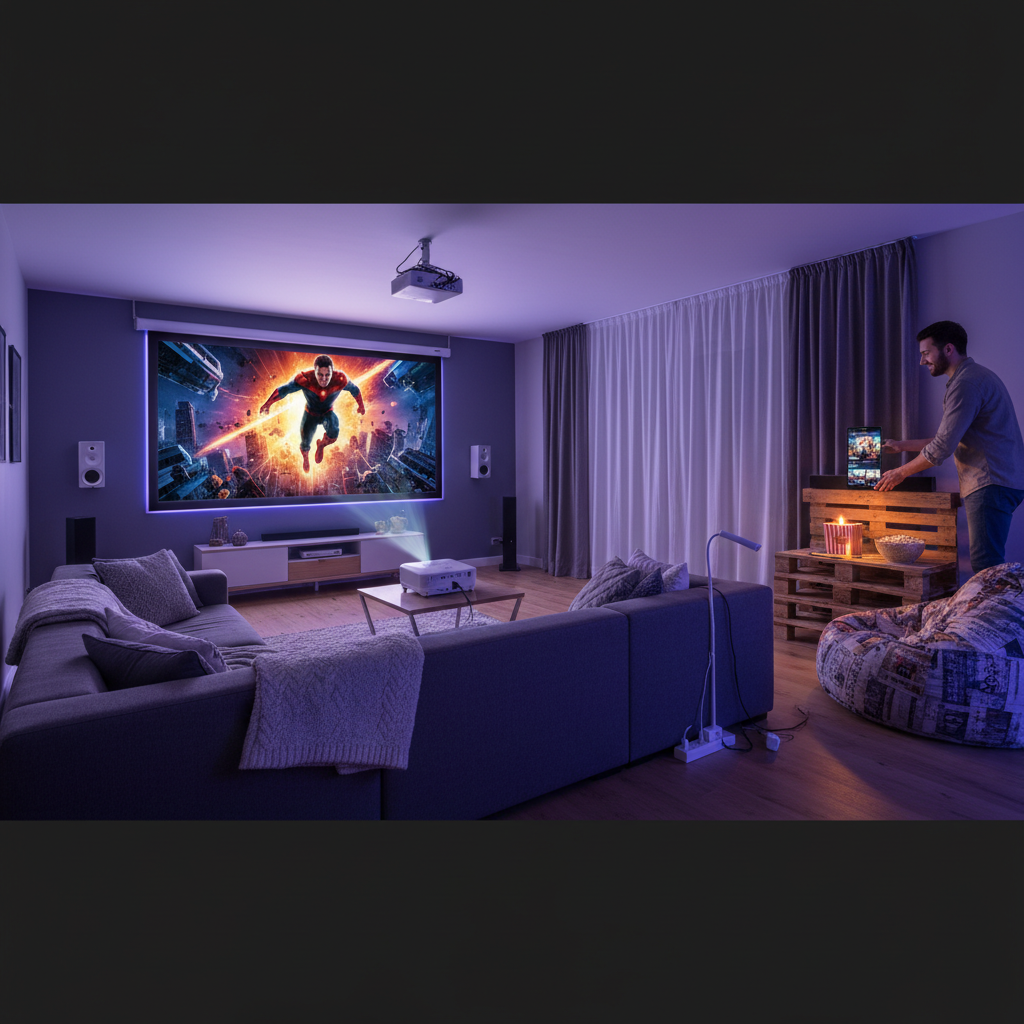
Steps
-
Optimize Your Room’s Light and Reflection Profile
The first step in any serious home cinema setup isn't technical—it's environmental. Light is the enemy of contrast. If you are using an OLED TV, ambient light washes out the perfect blacks; if you use a projector, it renders the image unwatchable. Invest in high-quality blackout curtains or cellular shades to eliminate window glare. Furthermore, consider the colors of your walls. While white minimalist aesthetics are popular, they reflect light from the screen back into the room, raising the 'black floor' of your image. If painting the room a dark matte grey or navy isn't an option, consider placing dark rugs or tapestries near the screen to absorb reflections.
-
Select the Right Display Technology for Your Space
You must choose between a Large Format TV or a Projector. For most small to medium rooms, a 65-to-85-inch 4K HDR TV is the best choice. Look for OLED panels if you prioritize deep blacks and vibrant colors, or Mini-LED if the room has some persistent natural light. If you have a dedicated dark room and want a screen size over 100 inches, a 4K Laser Projector is the way to go. Ensure your display supports HDR10+ or Dolby Vision, as these protocols allow the screen to adjust brightness and color on a frame-by-frame basis, providing a much more lifelike image.
-
Master the 'Ear-Level' Audio Placement
Great sound is 50% equipment and 50% placement. For a standard 5.1 surround sound setup, your center channel (which handles dialogue) should be directly below or above the screen, aimed at your ears. The front left and right speakers should form an equilateral triangle with your primary seating position. Most importantly, do not place your surround speakers directly behind you; they should be slightly to the side and behind (at roughly 110 degrees). If using a soundbar, ensure it has 'up-firing' drivers to bounce sound off the ceiling, simulating the height channels found in movie theaters.
-
Calibrate Your Software and Disable Motion Smoothing
Most TVs come out of the box with 'Store Mode' or 'Vivid' settings that make colors look artificial and blueish. The most important software tweak you can make is turning off 'Motion Smoothing' (sometimes called CineMotion or TruMotion). This feature adds artificial frames that create the 'Soap Opera Effect,' ruining the cinematic 24-frames-per-second look of film. Switch your picture mode to 'Filmmaker Mode' or 'Cinema' to get the most accurate color temperature, and ensure your streaming device is set to output the highest possible bitrate.
-
Establish a High-Speed Infrastructure
High-definition 4K streaming requires significant bandwidth. To avoid buffering and 'bitrate starvation' (which makes the image look grainy or blocky), connect your smart TV or streaming box via an Ethernet cable rather than Wi-Fi. If you must use Wi-Fi, ensure you are on a 5GHz or 6GHz band. Additionally, verify that your HDMI cables are 'Ultra High Speed' (HDMI 2.1) certified. This ensures they can handle the 48Gbps data load required for 4K at 120Hz with uncompressed Dolby Atmos audio, preventing blackouts or signal drops during intense action scenes.
Average rating: No ratings yet
Log in to rate how helpful this was.
Comments
-
How to Host a Movie Night That Feels Like an Actual Event
Howto · July 21, 2026 -
Will Comic-Con 2026 Produce a Trailer With 25 Million Views in 72 Hours?
Prediction · July 21, 2026 -
Will Spider-Man: Brand New Day Open Above $220 Million?
Prediction · July 21, 2026 -
Will The Odyssey Cross $500 Million Worldwide by July 31?
Prediction · July 21, 2026 -
What makes a streaming subscription worth keeping month after month?
Poll · July 21, 2026